
AI coding tools are now part of most development workflows. The problem is that the work of making them useful tends to happen individually. Someone figures out how to do something well, moves to the next project, and that knowledge disappears with them. At Audacia, we built a shared library to fix that. What started a year ago as a prompt library has grown into a centralised place where prompts, agent configurations, skills, hooks and MCP server guidance live, ready for anyone in the organisation to find and use.
This post covers what the library contains, how we decide what type of resource to reach for, what it takes to make the contents discoverable, and whether the ongoing effort is worth it.
What is an AI resource library?
An AI resource library is a centralised, shared repository where prompts, agent configurations, skills, hooks and instructions are collected, organised and made available for others to use. Rather than living in a developer's local files or a chat window, that work is stored somewhere the whole team can find it, contribute to it and build on it over time.
Ours started as a prompt library. It now also holds agent instruction files, skills, hooks and MCP server configuration, because those turned out to be the other things worth sharing, or that people were writing once and losing.
Why individual AI tooling doesn't scale
Getting the most out of AI coding tools is a time-intensive exercise that relies on multiple rounds of iteration and fine-tuning, whether that’s refining a prompt, configuring an agent or writing a skill. When every developer does that work privately, the team doesn’t benefit from it. Someone writes a useful prompt for generating mock data to a particular schema, moves to the next project and it’s lost and someone else solves the same problem from scratch months later. The same happens with agent configurations, skills and hooks. Getting the most out of these tools means treating them with the same discipline already afforded to code, documentation and standards.
What does an AI resource library contain?
The contents will vary depending on the organisation. It's important to assess the tools being used in your organisation and meet people where they are. Ours ended up with the following categories, expanding beyond just prompts:
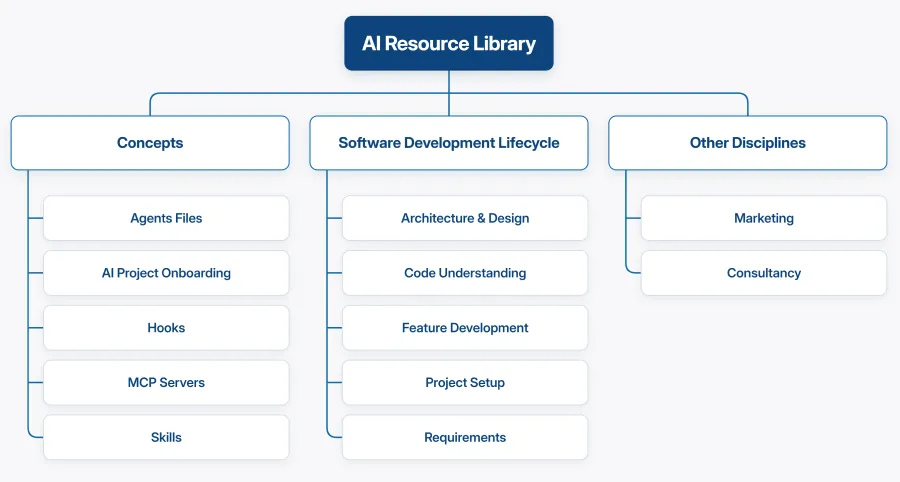
Concepts: Foundational guidance on working with AI assistants. This is where the explanatory material lives: what agent instruction files, hooks, skills and MCP server configurations are, how each one works and when to reach for it. The MCP pages also signpost the vetted servers, so developers aren’t evaluating every available option themselves.
Software Development Lifecycle: The section that has grown fastest, and the one most people now go to first.
- Architecture & Design, for the work you commit to before any code exists: solution and API design, data design, integration and security design, impact assessment, decision records and diagrams.
- Code Understanding, for building context in unfamiliar code: execution flow tracing, UI action flow tracing, dependency mapping, pattern extraction and impact mapping.
- Feature Development, one page per implementation task: API endpoints, UI components, domain logic, migrations, integrations, feature toggles and configuration.
- Project Setup, for scaffolding a new repository.
- Requirements, for instructions for turning PBIs and their acceptance criteria into the artefacts the team needs to deliver and verify them.
Other disciplines: The library isn't limited to engineering. Sections exist for other teams across the business, covering prompts relevant to their workflows.
Prompts, skills, agents or hooks: how do you decide?
The original version of this library held prompts, and the only real decision was whether something was a prompt or an agent configuration. There are now five options, and matching the option to the job is important.
A prompt is something you invoke deliberately to run at a specific moment for a specific task. A good example is a prompt for generating faker data for a test suite. You trigger it when you need it, it asks any clarifying questions and it produces the output.
An agent instruction file (AGENTS.md, or CLAUDE.md for Claude Code) holds the facts that are true for every task in a repository: the build and test commands, the definition of done, the rules that shouldn’t change. It loads on every turn, which makes it the highest-leverage file in the repository. Keeping this accurate means the per-task prompts stay short.
A skill is a folder of instructions the agent loads only when the task in front of it matches. It's where a procedure or process goes. Because the agent only reads the name and description up front, a skill costs almost nothing until it's needed, which is why the Software Development Lifecycle section is built from them. It also means the agent can reach for one without the developer knowing it exists, so a new joiner asking "how do I add an endpoint here?" gets the team's procedure without being told to ask for it.
A hook is a command the tool itself runs at a lifecycle point, such as after a file edit or before a shell command. Instructions are guidance the model may or may not follow on a given turn; a hook is enforcement. If a rule genuinely must hold every time (formatter applied, protected files never touched), it belongs in a hook.
An MCP server gives the agent access to data or systems outside the repository, and a subagent handles work that should run in its own context and report back.
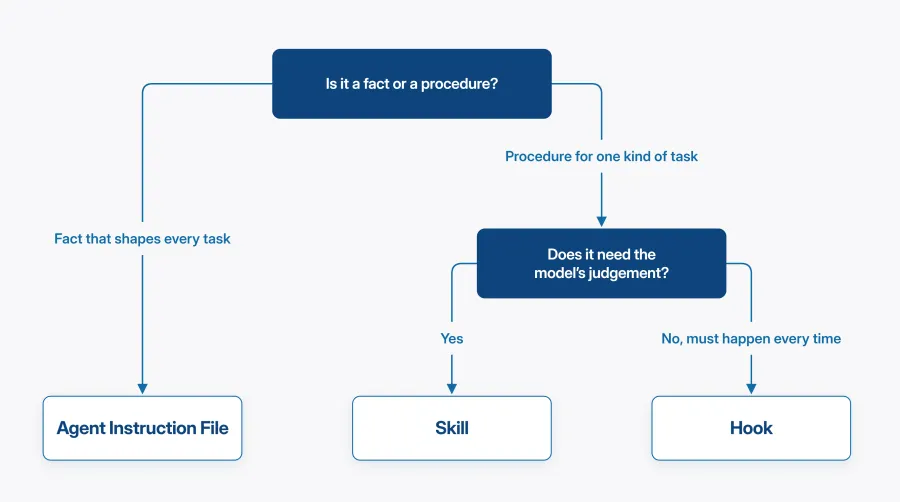
Two questions settle most cases. Is it a fact or a procedure? A fact that shapes every task belongs in the instruction file; a procedure that applies to one kind of task belongs in a skill. Does it need the model's judgement? If the requirement is that something happens whether the model agrees or not, that's a hook.
What makes a good prompt or skill?
Regarding prompts, the most important part is precision; specific, directive instructions produce more reliable results than vague instructions. If a prompt isn't doing what you want, the fix is almost always to be more explicit about what you're asking for, not to adjust anything else.
Skills have a second thing to watch. A skill that never fires is normally failing at discovery: perfectly good instructions the agent never loads, because the description didn't match the way someone phrased the request. Write the description for matching rather than for people. Say what it does and, explicitly, when to use it, including the words someone would type.
Beyond that, prompts, skills and hooks should go through the same review process as code. Ours are added to the library via pull request, which means they're reviewed before they're merged. As a rule, we encourage people submitting to the library to ask a specialist in that area to review the output. This matters more for skills and hooks than for prompts, because both run on everyone's machine once merged, and a hook runs with the developer's own permissions.
How do you get people to know the library exists?
Internal awareness is the first hurdle. To introduce the library and answer questions, a lunchtime session was run as part of the technical community, with follow-up announcements through the technical newsletter and internal channels. Getting it in front of people once isn't enough, it needs to come up repeatedly before it becomes something people reach for naturally.
The library has also been embedded into the places developers already go. It now sits alongside our tech radar, technical newsletter, engineering standards and project delivery standards as part of a centralised technical knowledge base. When someone is looking for guidance on how to approach a task, the library is in the same place as everything else they’d reach for.
How do you make the contents discoverable?
Awareness of the library is important, but it doesn’t guarantee individuals automatically reach for what’s in it. There are a few ways we’ve approached making sure the library’s contents surface when they’re relevant.
The most direct is a one-line pointer in a project's own AGENTS.md, such as "to add an endpoint, use the implement-api-endpoint skill". It tells the agent the skill exists, and it tells the next developer to open the file as well.
Frontmatter descriptions work differently but towards the same goal. Each skill and custom agent in Claude Code has a short description that Claude reads to decide whether to invoke it automatically. A security reviewer agent described as “use when modifying authentication logic or reviewing security-sensitive code” is more likely to be picked up at the right moment than one described vaguely as “reviews code for security issues.” The description also tells a developer browsing the library when to invoke something manually.
How do you get people to contribute?
Shared resources tend to stall unless contributing to them feels easy and worth doing. The most common concern raised was time. Writing something that works takes iteration and generalising it for the library is an added step on top.
The answer we landed on is to contribute as you go. If something has worked well on a project - a prompt, a skill, an agent configuration - take five minutes at the end to make it generic before you move on. Remove the project-specific context, make the variables explicit and add it to the library. It not only benefits the wider organisation, but you can also use it again on different projects or use cases.
To help with the genericising step, you can use an LLM directly: paste in what you’ve written and ask it to rewrite it as a reusable, context-neutral template. It's a fast step and produces something immediately usable by others.
The library also needs clear scope. Contributors should know what belongs in it and what doesn't, and how to structure an addition. Ours does this with a naming convention (*.prompt.md, *.instructions.md, *.agent.md, and a .skill folder for skills), a guidance page in every directory explaining when to use what's in it, and a placeholder syntax for the values a user is expected to replace. Without that, you get inconsistency and then people stop trusting it.
Is it worth the effort?
An AI resources library needs ongoing maintenance and updates. One reason is that model behaviour changes between versions. For example, a prompt written six months ago for one model may produce noticeably different results on a newer one. Tracking when each resource was last updated, and which model it was written for, gives a user the context they need to spot that it that might be drifting. Tooling is also changing rapidly - hooks, skills and MCP all arrived after we started the library, and each one changed what belonged in the library.
There's a related decision worth making early: whether the library is tied to one tool or not. Teams rarely standardise on a single agent, so ours documents each concept once and then covers where Claude Code, GitHub Copilot and Codex differ. That costs a little on every page and saves rewriting the library each time someone adopts something new.
On the other hand, the infrastructure required is minimal: version-controlled markdown files, a contribution process built on top of the existing PR workflow, and some structure around what goes where.
What you get in return is compounding: resources improve over time, onboarding is faster because the guidance exists, and the team stops solving and re-solving the same problems independently. It won't fix everything about how your team uses AI tooling, but it's one of the more concrete things you can do to raise the baseline.